

How Microsoft Power Platform is helping to modernize and enable...
In this webinar, our experts showcase a variety of demo use cases of how different components of the...
Today we're going to talk about how to go about resetting the CRM 2011 ribbon. (If this topic interests you, you might also want to visit the complete guide to CRM 2011 ribbon customization.)
If you recently upgraded from Dynamics CRM 4.0 to Dynamics CRM 2011, you may have noticed that all the entities that had customizations in the toolbar now have an extra tab on the form named ISV (e.g. ISV Account Form).
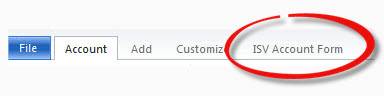
Further investigation would reveal that there is a new web resource for each entity that had a customized toolbar. This new web resource will be a script file and the description will clearly tell you that it is regarding the entity’s ribbon.

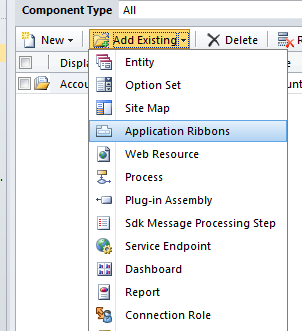
In order to reset the ribbon for an entity (or multiple entities), add all the entities to a new solution (do not add required components – they are not needed). Include the item “Application Ribbon” in the solution.
Export the solution and save it.
Uncompress the solution file and open “customizations.xml” with a text editor that can edit XML. Once open, do a search for “
[sourcecode language="xml"]
[/sourcecode]
Do this for each instance of
You may also be interested in:
Happy CRM'ing!







For some reason this does not have any effect on my problem. I'm trying to reset form ribbon buttons but editing the RibbonDiffXml part and importing the edited solution gives me no changed results at all.
One big difference is that I did not upgrade from CRM4 to CRM2011
Hello I did Update from Crm 4 to Crm 2011 ,and i have done same thing which discuss in this article.but when I Import solution an error occur "The import of solutions:Customer failed" and not successfully upload
Hi Rizwan - Do you have a recent update rollup such as UR 11 or UR 12 ?
Yes thanks i have solve this issue due to AppPole Setting which is converted to Network User,
Please tell me I need to add Menu button in Ribbon from Account form,i have tried in Pragma tool and ribbon editor but this thing is not happen for this tool. is there any solution ? or can we add Menu item through ISV file