

How Microsoft Power Platform is helping to modernize and enable...
In this webinar, our experts showcase a variety of demo use cases of how different components of the...
Have you seen this one? If so take a look at this blog and the Microsoft Dynamics CRM Experts at PowerObjects might be able to shed a little light on a solution.
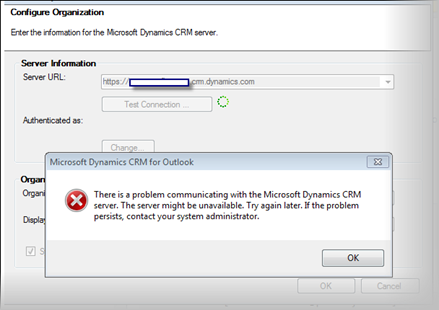
This is a known issue with a couple easy to fix steps. Below are the potential causes and resolutions:
Cause 1: The issue could be due to having the Windows Live Essentials beta installed.
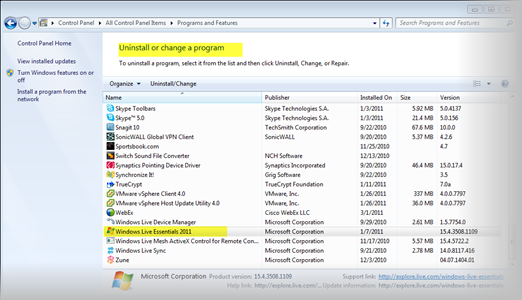
Cause 2: The issue could be due to issues with Windows Live Essentials 2011.
Cause 3: The issue could be due to the install of Windows Live Sign-in Assistant.
Resolution
Option 1: Uninstall the Windows Live Essentials Beta or upgrade to Windows Live Essentials 2011.
Then try to run the configuration wizard again. Windows Live Essentials 2011 can be downloaded from the following link - http://explore.live.com/windows-live-essentials?os=other
Option 2: Run a repair on the Windows Live Essentials 2011.
Then try to run the configuration wizard again.
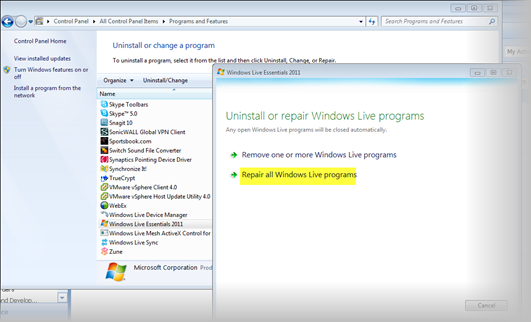
Option 3: Run a repair on the Windows Live Sign-in Assistant.
Then try to run the configuration wizard again.
If you are still hitting a wall then you might want to get someone at PowerObjects involved – I know we can get this issue solved – you can contact us here.
Happy CRM'ing






Don't forget the clock settings on the client! I got this message on a client whose clock was behind a little over five minutes. Timezone settings can apparently generate this message, too: http://support.microsoft.com/kb/2502671
Hi,
I have tried both the solutions.... did not solved my problem...
I am trying to install CRM 2011 outlook client in XP system. I am using crm 2011 RTM on-premise version
any help much appreciated
I am still hitting the wall. I have on-premises CRM 2011 Workgroup version and I am getting the same error over and over again. I can only access the web client.
Please help
My enviroment is set up as follows
I have a base machhine that is on a different domain. SQL, CRM and SharePoint 2010 virtual servers that belong to a different [live] domain.
SOLUTION.
According to people who have had the same issue; the base server has to be in the same as the virtual servers.
I have not tested this as yet. If it works please let me know
Am facing the same issue in on-premise CRM.
Date and time format and Time zone is same as server.
Am able to access the crm from browser. And it's showed list of organizations and i selected 1 organization and click on ok then i got the above error.
You can find same in Forum. here is the link.
https://community.dynamics.com/crm/f/117/t/74576.aspx?GroupToJoin=57
Can you help me on this....