

How Microsoft Power Platform is helping to modernize and enable...
In this webinar, our experts showcase a variety of demo use cases of how different components of the...
Saving clicks is something that everyone efficient businessperson likes to do. Well, PowerOneView helps you achieve that goal! Instead of clicking through the left navigation of a record to view the record's history, now you can view everything related to a Microsoft Dynamics CRM record in one window.
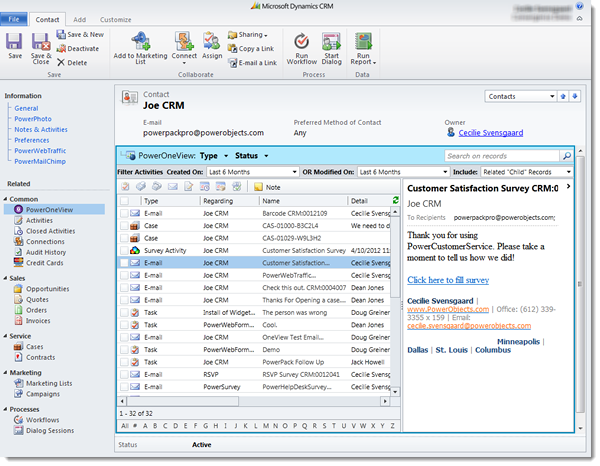
There's a handy, customizable reading pane included on the right hand side that lets you quickly drill down into a related entity without actually opening it. Plus, PowerOneView can be configured to include anything you'd like - even custom entities!
Now you're probably thinking that something as powerful as PowerOneView is difficult to set up, right? Wrong. You don't have to know any type of code to configure PowerOneView and it imports in just minutes!
Want to see how it works? Check out the video below. Want to try PowerOneView yourself? Download and register your FREE 30 day trial today!
Happy CRM'ing!







Hi
Is the Poweroneview available for on-premise and on-line?
If we offered it ot our customers, is there a partner margin?
is it branded or can it be "white box"
Thanks
Jerry
To answer your question, PowerOneView works with any deployment of CRM2011 – online and on-premise. Unfortunately, we do not have an official partner program for the PowerPack. The add-ons are priced in such a way that they are extremely affordable for customers, but don’t leave much of a margin for partnership. We will help and support any of your customers that install the add-ons if need be. Please feel free to download the free 30 day trial of PowerOneView if you’d like to test it yourself.