

How Microsoft Power Platform is helping to modernize and enable...
In this webinar, our experts showcase a variety of demo use cases of how different components of the...
Recently one of our clients came across an issue in CRM 2011 Online, where sub-grids that had been added to their Forms were not displaying correctly. When creating a new record, the sub-grid would show up with the correct columns displayed but as soon as the record was saved, the sub-grid would change to a grey box with nothing in it!

In addition, users were getting a script error on the page when they tried to navigate away from the record.
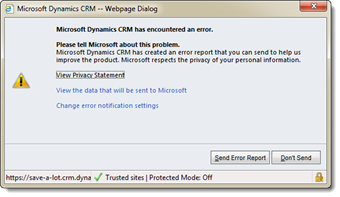
The error looks something like this:
Microsoft Dynamics CRM Error Report Contents
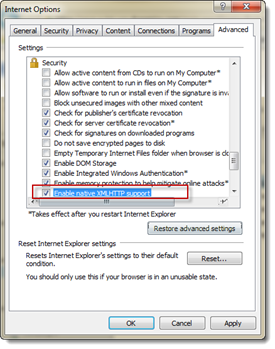
Resolution: Enable native XMLHTTP support in the Security section of the Advanced Tab in internet options.
Hope this helps someone out there – If you are looking to connect with Microsoft CRM Experts – please reach out. We are the Proud winner of the 2015 Microsoft Partner of the Year for Cloud Customer Relationship Management, PowerObjects is the preferred partner for implementing, supporting, and growing CRM solutions. Through unparalleled offerings of service, support, education, and add-ons, PowerObjects can help tailor custom solutions for your business.
Happy CRM'ing







I too have experienced this issue and unfortunately it does not seem to have been fixed with Rollup 2. Thanks for this as I had to rollback my update but now I can reinstall !!!
Thank you for this information!
We had this issue intermittently, and we did further testing and discovered that if the grid is in a tab that is collapsed by default, it will render successfully when the tab is expanded, but the script error will still show. A recommendation is to always put sub grids in tabs that are collapse by default so that, although there is still an error message, the client will be able to see the data even if they are unable or unwilling to change theor IE advanced settings.
Thanks for your solution, it was really helpfull for me