
How Microsoft Power Platform is helping to modernize and enable...
In this webinar, our experts showcase a variety of demo use cases of how different components of the...
In CRM, there is option to display label per section on a form. This can be done easily at design time.
Incase you need to display information in multiple columns with headings for each column, the design time does not support this. To get the desired effect, you can write JS.
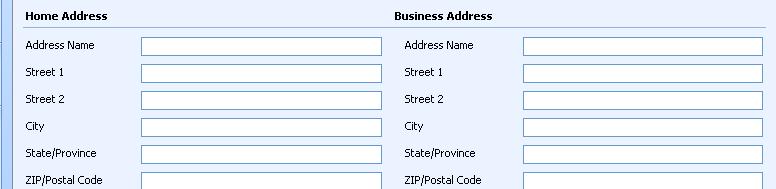
The script below has comments and is self explanatory. Use IDE Dev toolbar to get IDs where needed.
 //*****************

//Set Address Title

fncChangeAddressTitle = function()

{

     //get a hande to the tab containing our form fields

     var objTab = document.getElementById('tab0');

     //locate all of the HTML Tables on the Tab

     //select the ID of table in which you want to show column headings. It will stay consistent

    var objTable = document.getElementById('{5779eb54-a281-4f49-924f-7dad336c7107}');
 if (objTable != null)

{         //Get the table element to show headings

         var objCells = objTable.getElementsByTagName("td");

         //Get cell that has Title

         var objCell = objCells[0];

         var strHtml = '<table width=100%><tr><td width=50%><b>Home Address</b></td>

<td width=50%><b>Business Address</b></td></tr></table>'

         objCell.innerHTML = strHtml;
}

}